
A safer deployment workflow with SFTP, file comparison and Nginx checks
Plan a small release with explicit destinations, reviewed file differences, validation, verification and a realistic rollback path.

A deployment is not finished when the final file reaches the server. The release still needs the right configuration, a controlled activation and evidence that the intended user operation works. This is especially important for small projects where one person manages source files, server access and the reverse proxy. A simple release deserves a clear process even when it does not need a large delivery platform. This guide follows a fictional static frontend and application configuration update using a Mac workspace, SFTP and Nginx inspection. It is a planning example, not a universal deployment recipe, and its timing chart uses illustrative values.
Describe what the release changes and what success means
Write a short release note before transferring files. Identify the application, destination host, release identifier and expected behavior. Include the user operation you will test after activation. For a frontend update, success might mean that the new page loads its assets and an existing form still submits correctly. A successful HTTP status alone may not establish either condition. Choose a verification that reflects the actual change.
Also name the person responsible for deciding whether to continue or stop. Even in a solo project, writing that decision down helps prevent an improvised sequence when something looks wrong. Record a maintenance window if the change can interrupt service. All in Term can keep the local terminal, remote files and Nginx views close together, but the release plan supplies the meaning that connects those tools into an operational sequence.
A release has checkpoints after the upload.
- 01
Prepare
Identify artifact and rollback limits.
- 02
Compare
Review the intended differences.
- 03
Validate
Check configuration and dependencies.
- 04
Verify
Test the user-facing result.
Conceptual workflow · follow each check before moving to the next step.
Confirm the local artifact and the remote destination
Know which local directory contains the release artifact. Source files, development output and production bundles may coexist under similar paths. Review the build result and identify the files intended for deployment. Avoid transferring a whole working directory merely because it is convenient. Development caches, local credentials and unrelated files can make the release harder to understand or expose information that does not belong on the server.
On the remote host, confirm the destination path, ownership and the service that reads it. A writable directory is not necessarily the active release directory. Check the relevant configuration and the existing layout through the team's normal process. If the application uses a managed release system, follow that system rather than introducing a parallel manual deployment path. The SFTP destination should be a deliberate part of the release, not a guess based on a familiar folder name.
| Stage | Confirm | Keep available |
|---|---|---|
| Prepare | Artifact, host and release identifier | Expected behavior and stop criteria |
| Compare | Only intended differences are selected | Prior artifact and compatible configuration |
| Validate | Relevant configuration and service checks pass | Exact validation output |
| Verify | Fresh requests and important existing flows work | Timestamped result and rollback decision |
Review the artifact before it becomes the active release.
The comparison bridge represents review of intended differences; the retained tray represents prior material used by an application's rollback process.
Control the destination
Confirm that the selected artifact and remote path belong to the intended environment.
Understand rollback
An earlier folder cannot automatically reverse database migrations or other persistent effects.
Review differences before replacing existing files
Use folder comparison to distinguish intended modifications from accidental local drift. Inspect configuration differences separately from generated application assets. A release can introduce a new bundle while an unrelated server setting should remain unchanged. Review additions, removals and changed content, and decide explicitly which differences belong to this release. Keep the comparison scope small enough that the review remains meaningful.
Prepare the rollback material before activation. Depending on the application, that may mean retaining the previous release artifact and its compatible configuration. A copy of one file is not a complete rollback if the release also changes the database or other persistent state. Write down those dependencies and determine whether reversal is actually supported. A realistic rollback plan names its limits instead of promising that every change can be undone by uploading an older folder.

Transfer completion is a milestone.
The destination and selected files still need inspection, and the activated service still needs a meaningful behavior check.
Concept illustration, not an application screenshot.Transfer into a controlled location and inspect completion
Upload through the agreed release path and watch the transfer result. If your deployment process supports a staging directory, use it to keep incomplete files away from the active application. Do not assume that such a directory alone makes activation atomic. The safe activation mechanism depends on the application's design, filesystem and deployment process. Review that mechanism before relying on it for a live release.
After transfer, check that the expected files exist at the destination and that their ownership and access match the service requirements. Confirm the release identifier through your established method. A complete progress bar establishes that a transfer operation finished; it does not prove that the right files were chosen or that the application can use them. Preserve the distinction so the later verification checks do not disappear behind an attractive success notification.
Example time budget for a small reviewed release
Unit: planned minutes. Synthetic example values, not production measurements.
Bars start at zero and share the same linear scale. Exact values are printed alongside each bar.
Validate configuration before an intended activation
If the release changes Nginx configuration, inspect the actual file and its included context. A small edit can affect a shared virtual host or a route used by another service. Run the appropriate configuration test before an intended reload, using an account with the required access. A validation failure should be understood and corrected before continuing. Repeatedly forcing activation does not make an invalid configuration more reliable.
Keep application checks separate from proxy syntax checks. A valid Nginx configuration can still point to an unavailable upstream, and an application can start while its dependencies remain unusable. Confirm the endpoint, credentials and relevant service behavior in the intended environment. If validation requires application-specific commands, document them in the release plan. Do not replace them with a generic terminal command simply because it produces a reassuring green result.
Verify fresh requests and existing behavior
After activation, test the exact operation defined at the start. Check a fresh page load, the important asset paths and the application behavior affected by the release. Inspect recent Nginx access and error evidence for the same hostname and time window. If a CDN or browser cache sits in front of the application, distinguish cached behavior from a request that reaches the changed origin. The testing path should be clear enough to explain what was actually verified.
Check one important unchanged operation as well. A navigation update can break an existing form, and a shared configuration edit can affect another route. Compare results with the expected baseline and record the observation time. If the evidence is uncertain, keep the release under observation or use the agreed rollback decision. Avoid interpreting the absence of immediate complaints as proof that every critical path is healthy.

An upload still needs validation and verification.
The first gate stands for configuration validation. The second stands for a real behavior check after activation. Passing one does not replace the other.
Validate configuration
Use checks appropriate to the service before its intended activation.
Verify the release
Repeat the user-facing operation, inspect fresh evidence and retain the agreed stop or rollback criteria.
Record the result and improve the next release
Save the release identifier, destination, changes made and verification results in the normal project record. Note any manual step that was easy to misunderstand. A repeated ambiguity is a good candidate for a clearer script, a documented convention or a more structured deployment system. The purpose is to reduce uncertain decisions, not to accumulate a longer checklist for every future release.
If you rolled back, record what was restored and which effects could not be reversed. Investigate the failed assumption before retrying. All in Term supports the surrounding work through file comparison, transfers, editing, terminal sessions and Nginx inspection. Those capabilities are most useful when each action has a clear precondition and a visible result. A safer small deployment is one whose path from local artifact to user-facing behavior can be understood afterward without reconstructing every click.
Inside the application: a scoped local example
This capture uses the shipped UI component in an isolated renderer. The host, files and service data are demonstrations, not a production session. It illustrates the surrounding workflow; it does not verify every service-specific command in this guide.
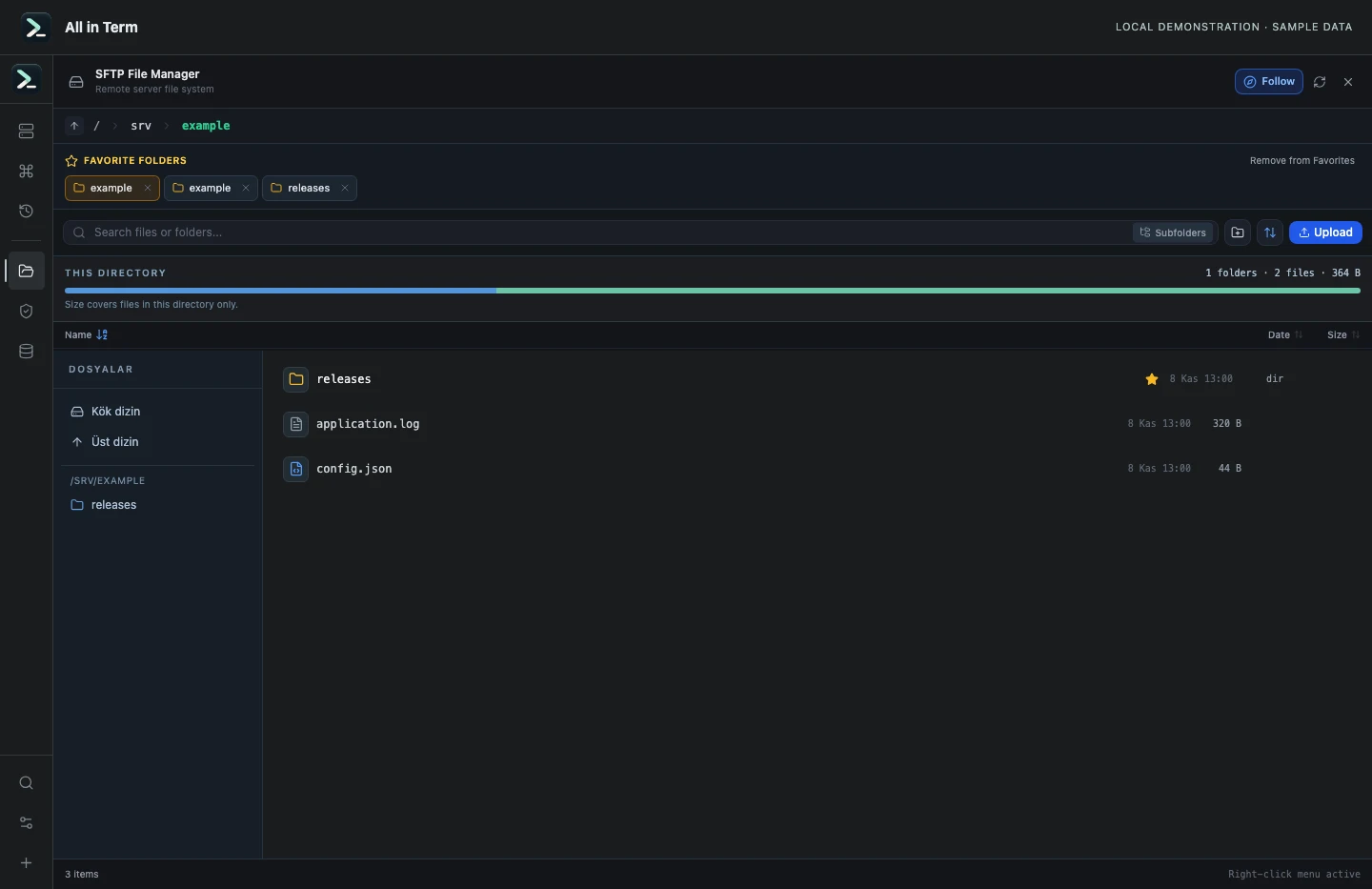
SFTP component with a synthetic remote directory based on temporary local files. Captured 2026-11-08. Open the image to inspect details.
List an isolated example directory
Executed /bin/ls against a newly created temporary directory.
Executed check
ls -1Recorded output
application.log
config.json
releases
Recorded 2026-11-08. Executed locally against synthetic fixtures. No production host or database was contacted. Read the recorded checks.
A small command example
Read the comments, confirm the active host and adapt any example names to your environment before running commands.
# On the intended remote host
# Read-only context checks
hostname
pwd
# If this release changes Nginx configuration:
# validate before an intended reload; permissions may be required
nginx -t
Further reading
Official documentation for the underlying tools. The workflows and synthetic examples above are editorial guidance, not performance claims.