
Export database results with their meaning intact: CSV, JSON and SQL boundaries
Choose a result format deliberately, preserve query scope and understand preview limits, nulls, large values and receiving-tool behavior before sharing data.

A file can open successfully while still telling the wrong story about the data it contains. The exported rows may be only one page, a large value may already be a preview, and a spreadsheet may interpret an identifier or a text cell differently from the database. A result export therefore needs context as well as bytes. This guide explains how to choose and validate CSV, JSON and SQL-text output around All in Term's read-only database workspace. It is a workflow for inspected results, not a replacement for a database backup or recovery system. The accompanying charts contain fictional sample counts and transfer sizes.
Define the result that should leave the database
Start with the recipient's question. A support investigation may need a few recent identifiers and statuses, while an analysis task may need a clearly filtered period and selected fields. Write the query scope before choosing an output format. Include the environment, selected table or query, filters, ordering and observation time in the accompanying note. These facts help a recipient assess whether the file can support the intended conclusion.
Keep the result narrow enough to inspect. Avoid selecting entire customer records merely because exporting them is convenient. Review the fields for secrets and unnecessary personal information before moving them outside the database workspace. A technical export action does not decide who should receive the content. Use the project's normal access and sharing process so the convenience of a file does not silently widen the audience for sensitive data.
Carry the query's meaning into the exported file.
- 01
Scope
Choose fields, rows and context.
- 02
Inspect
Check the returned values and bounds.
- 03
Format
Choose a known receiving workflow.
- 04
Validate
Compare representative imported values.
Conceptual workflow · follow each check before moving to the next step.
Distinguish returned rows from the whole table
All in Term exports the current returned result. A table preview is paged, so the visible result can represent only part of the table. A custom read query can also contain a limit or a filter that intentionally excludes other records. State that scope explicitly in the filename or accompanying note. Do not label a fifty-row review as an entire database export simply because the export action completed without error.
For repeated analysis, use a query with a predictable order and an appropriate snapshot strategy when consistency matters. A changing production dataset can produce different rows between requests. If the task requires a complete and recoverable copy, use the database team's established backup or data-transfer procedure instead. PostgreSQL's COPY facilities illustrate that bulk movement is a separate database capability; this guide does not claim that the app's result exporter implements every such workflow.
| Format | Useful for | Review carefully |
|---|---|---|
| CSV | Tabular exchange with a known importer | Type inference, null/empty distinction and formulas |
| JSON | Structured returned rows | Driver types, long identifiers and previewed values |
| SQL text | A reviewed result script for a compatible target | Identifiers, types and execution side effects |
| Database backup | An established recovery process | Scope, restore procedure and tested completeness |
An export contains the result you actually retrieved.
The selected tray represents returned query data. Exporting that tray is not the same as backing up the entire database.
Record the scope
Keep the query, selected fields, ordering and result size with the exported file.
Inspect previews
If the source result contains a bounded value preview, exporting it does not restore the omitted content.
Check whether large values were already bounded
A compact grid can show a short display preview, and a table query can bound a long value before it reaches the client. These are separate boundaries. If the returned value is already truncated, exporting it preserves that returned preview rather than reconstructing the omitted document. Inspect any preview marker and the query shape before using the file as evidence about a complete JSON, XML or HTML payload.
When a full document is necessary, use a deliberately scoped and authorized retrieval of the relevant field and record. Confirm its size and completeness before sharing it. Do not remove all result bounds across a large production table just to retrieve one payload. The first graph uses invented sizes to illustrate how a summary result differs from a full-document selection. Actual transfer, database work and client behavior depend on the query and workload.

Returned rows are not a recovery system.
A result export can be useful evidence while remaining different from a complete backup or portable migration.
Concept illustration, not an application screenshot.Choose CSV for a known consumer, not for universal fidelity
CSV is convenient for tabular exchange, but its interpretation depends on the receiving tool and import settings. Review encoding, delimiters and how the consumer handles dates, large identifiers and empty cells. A spreadsheet can infer a type that differs from the intended database meaning. Check representative values after import, especially identifiers with leading zeros or numbers that should remain exact text.
Also review how the exporter represents null and empty values. In the current app's CSV result output, those can both become empty fields, so the file alone may not preserve that distinction. Untrusted text needs care in spreadsheet workflows because cells can be interpreted as formulas. Quoting a field for CSV syntax is not a universal formula-safety guarantee. Use an appropriate receiving workflow and inspect the data before allowing content to be treated as executable expressions.
Fictional payload sizes for two result shapes
Unit: MiB in example. Synthetic example values, not production measurements.
Bars start at zero and share the same linear scale. Exact values are printed alongside each bar.
Treat JSON and SQL text according to their actual purpose
JSON can preserve a structured representation of the returned rows and explicit null values, but it still reflects the values supplied by the query and database driver. Inspect large identifiers, timestamps and serialized document fields in the receiving program. A JSON file containing row objects is not automatically the same as the source database's native backup format or the full original document behind every preview.
SQL-text output deserves a different review because executing it changes a destination. All in Term can produce INSERT-style text for the current result, but compatibility depends on identifiers, types and the target engine. Read the output and validate the intended destination through your normal database process before any execution. Do not present a generated result script as a guaranteed portable migration. The receiving environment is part of the operation, not a detail to discover after running the file.
Validate a small representative sample after export
Compare the file's row count and fields with the result you intended to export. Choose representative cases: a null, an empty string, a long value, a non-ASCII name and any identifier whose exact representation matters. Open the file with the actual consuming workflow rather than only a generic text viewer. A format can be syntactically valid while a particular import configuration changes its meaning.
The second synthetic graph lists fictional sample checks to emphasize deliberate validation. Its categories are not quality scores and do not estimate how frequently an exporter fails. Record any information lost through previewing or formatting, and communicate that limitation to the recipient. If the file does not support the question, adjust the narrowly scoped query or format rather than adding an unsupported explanation to make the existing file seem sufficient.

Review the receiving tool as well as the file.
Different output formats carry different interpretation risks. The receiving application determines how an exported value is read and used.
Preserve meaning
Check nulls, large identifiers, dates and text encoding in the tool that will consume the export.
Treat content as data
Review spreadsheet formula interpretation and SQL execution consequences before opening or reusing untrusted output.
Keep exports understandable and controlled over time
Use filenames that identify the purpose, environment and relevant period without exposing secrets. Keep the query or an appropriate description alongside the result, and follow the project's retention policy for temporary exports. A desktop download can outlive the incident that justified it. Review where it is stored and who can access it rather than assuming that leaving the database also removed its access requirements.
A useful result export preserves enough meaning for another person to use it responsibly. All in Term brings read-only querying, paged table inspection and CSV, JSON or SQL-text output into one workspace. The operating habit completes the feature: identify the result, understand any preview boundaries, choose a known consumer and compare representative values after export. When those facts are explicit, the file becomes a reviewable artifact instead of a convenient but ambiguous collection of rows.
Inside the application: a scoped local example
This capture uses the shipped UI component in an isolated renderer. The host, files and service data are demonstrations, not a production session. It illustrates the surrounding workflow; it does not verify every service-specific command in this guide.
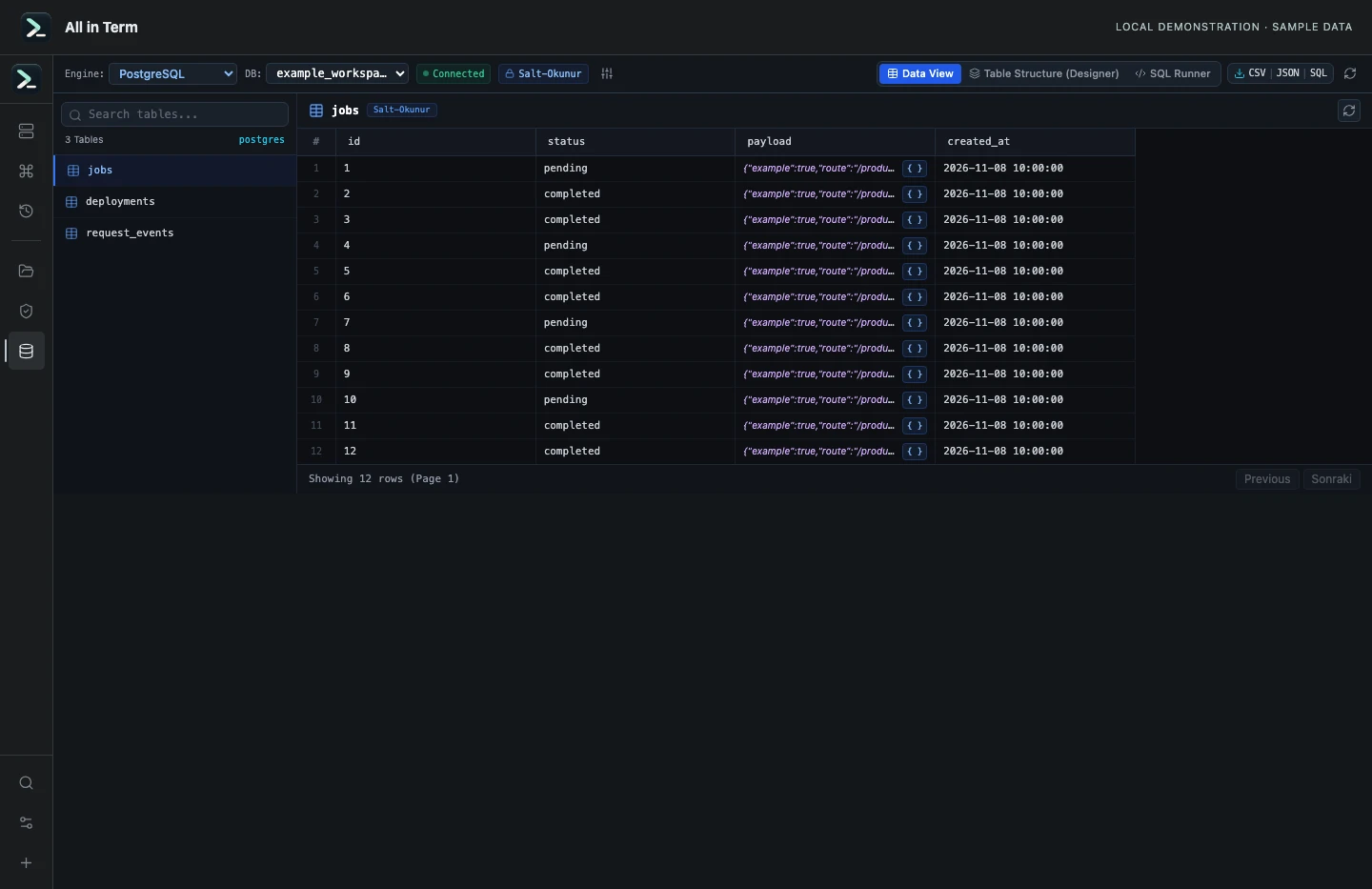
Database component with synthetic PostgreSQL-shaped rows; no database server was contacted. Captured 2026-11-08. Open the image to inspect details.
Check bounded previews and read-query validation
Executed the current query builder, preview limiter and SQL validator against a synthetic jobs schema. No PostgreSQL server was queried.
Executed check
buildTablePreviewQuery("jobs", schema, "postgres", 50, 0)
isReadOnlySqlQuery(SELECT example)
isReadOnlySqlQuery(DELETE example)
Recorded output
Generated query includes LIMIT 50 OFFSET 0: true
Large text projection includes a 2048-character bound: true
Client preview shorter than the 6,000-character fixture: true
SELECT example accepted: true
DELETE example accepted: false
Recorded 2026-11-08. Executed locally against synthetic fixtures. No production host or database was contacted. Read the recorded checks.
Representative checks in a fictional export review
Unit: sample values inspected. Synthetic example values, not production measurements.
Bars start at zero and share the same linear scale. Exact values are printed alongside each bar.
A small command example
Read the comments, confirm the active host and adapt any example names to your environment before running commands.
-- Replace names with your schema and choose an appropriate scope
SELECT id, status, created_at
FROM example_jobs
ORDER BY created_at DESC, id DESC
LIMIT 50;
-- Export only after reviewing the returned result and its limits
Further reading
Official documentation for the underlying tools. The workflows and synthetic examples above are editorial guidance, not performance claims.