
Browse large database tables without letting JSON, XML and HTML take over
Keep database exploration readable with narrow queries, stable ordering, bounded previews and a separate view for large values.

A database grid can become difficult to use even when it contains only a few rows. One cell may hold a complete HTML document, a large JSON response or an XML payload with thousands of characters. If every value expands into the table, the layout becomes unstable and the browser spends effort rendering content that the user has not asked to inspect. The solution involves both the query and the interface. This guide explains a practical way to explore large tables, keep the result set bounded and inspect rich values deliberately. The sample data and chart are illustrative rather than measured application benchmarks.
Decide whether you need rows or a document
A grid is useful for comparing records across a small set of fields. A document viewer is useful for understanding a single large value. Trying to combine both experiences in every cell creates a conflict: the table needs predictable dimensions, while the document needs enough space to be read. Start by deciding which question you are answering. Finding a failed job may require its identifier, status and time, while understanding its failure payload requires a separate focused inspection.
In All in Term's database workspace, begin with the schema and table structure, then browse a manageable set of rows. Treat a truncated preview as a signal that more content exists, not as proof that the stored value ends there. Open the large value when the investigation reaches that record. This approach keeps the comparison view useful and avoids turning every neighboring row into a full document editor.
From a table to the one value you need.
- 01
Schema
Understand fields and relationships.
- 02
Small result
Select useful columns and stable ordering.
- 03
Row preview
Compare bounded summaries.
- 04
Value detail
Inspect one complete document.
Conceptual workflow · follow each check before moving to the next step.
Ask for a small set of useful columns
A broad selection is convenient during an initial experiment, but it can retrieve large values unrelated to the question. If you are looking for recent failed jobs, start with identifiers, status and creation time. Add the payload only after finding the relevant record. Reducing selected columns can decrease the data sent to the client and make the output easier to understand. The actual execution cost still depends on the database, storage and query plan.
Use explicit column names in reusable queries so that a later schema change does not silently alter the shape of your investigation. Describe the purpose of the query in a saved note or snippet. A colleague should be able to see why each field appears. The goal is not to ban broad exploration; it is to make the normal path narrow enough that a surprising document column does not dominate the result before you have identified a useful row.
| Task | Start with | Inspect separately |
|---|---|---|
| Find a failed job | ID, status, creation time | Error payload |
| Review imported content | ID, source, import status | XML document |
| Investigate a webhook | ID, response code, timestamp | JSON body |
| Check page records | ID, slug, published status | HTML source |
Keep the overview compact and the detail available.
The aligned grid represents bounded cell previews. The separate panel represents deliberate inspection of a complete large value, such as JSON, XML or HTML source.
Browse summaries
Use stable row dimensions to compare identifiers, status and time without rendering every document inline.
Inspect one value
Open the relevant payload after locating the record. Truncation in the grid should clearly indicate that more content exists.
Make pagination predictable
When browsing multiple result pages, use a deterministic order that includes a unique tie-breaker. Otherwise, the idea of the next page can be ambiguous, particularly when records share the same timestamp. A stable order makes it easier to compare findings and return to the record you saw earlier. Be aware that a changing production dataset can still change between requests, so pagination is not a substitute for a consistent snapshot when the task requires one.
A simple LIMIT is useful for bounding returned rows, but it is not a universal performance guarantee. Queries can still sort, join or inspect substantial data before producing that small result. Review the plan when a bounded query remains slow. For repeated deep navigation, consider whether the application's query design should use a cursor based on an indexed ordering key rather than repeatedly skipping a growing number of rows. Choose the design around the actual access pattern.

Let the grid stay a grid.
Use predictable row dimensions for comparison, then open large JSON, XML or HTML values in a separate inspection view.
Concept illustration, not an application screenshot.Separate a preview limit from a query limit
A preview limit changes how much of a value the interface displays. A query limit changes how many rows the database returns. These limits solve different problems. If the server returns a large document and the interface shows only a small preview, the layout improves but the transfer may still be large. If the query returns only a few rows containing huge documents, the row count remains small while the client still receives substantial content.
The fictional chart below compares payload sizes for different exploration shapes. The numbers are made up to show the distinction, not to promise an optimization result. Measure the bytes and timings in your environment before making a performance claim. A useful workflow considers row count, selected columns, network transfer and rendering together. Improving one stage can expose a bottleneck in another, which is why the observation should cover the entire path from query to usable screen.
Illustrative payload sizes for different query shapes
Unit: MiB transferred. Synthetic example values, not production measurements.
Bars start at zero and share the same linear scale. Exact values are printed alongside each bar.
Inspect structured content as content
Once you select a record, open its large value in a view that can preserve whitespace and show the complete content intentionally. JSON benefits from indentation, XML from visible structure and HTML from being treated as source during database inspection. Do not execute arbitrary stored HTML just to make a preview look attractive. A database value may contain untrusted content, and a data inspection interface should preserve that boundary.
Copy or export the value only when you need it outside the workspace, and consider whether it contains personal information, credentials or internal identifiers. A screenshot of a result grid can expose more than the few fields discussed in a support conversation. For an example or bug report, create a small redacted reproduction. Preserve enough structure to explain the layout problem without sharing the original production document unnecessarily.
Use plans to investigate a slow query
When a query remains slow, separate the database's work from the client's display work. A plan can help explain why the database scans, joins or sorts a particular way. Ask whether the filtering and ordering match the available indexes, whether estimates fit the data and whether the requested result is larger than needed. Avoid assuming that adding an index is automatically the answer; indexes also have storage and maintenance costs.
Plain EXPLAIN describes the chosen plan without executing the query. EXPLAIN ANALYZE executes it to collect actual measurements, so use care with expensive statements and any statement that changes data. Follow the database team's process when testing against production. Compare the same query and relevant conditions before and after a change. A faster grid may result from a narrower result, a different query plan or less rendering; record which part actually improved.

Reduce the result before it reaches the screen.
The gates illustrate selecting useful columns and bounding returned rows. They are a conceptual query model, not a literal database execution plan.
Query boundary
Selecting fewer fields and rows can reduce the response payload. Actual database work still depends on the query plan.
Display boundary
A short client preview improves readability but may leave the transferred payload unchanged. Measure these stages separately.
Create a reusable exploration sequence
A practical sequence starts with the table structure, continues with a narrow ordered result and ends with focused inspection of one value. Keep exports bounded and name them clearly. If you discover that a frequently used table contains very large documents, document the preferred summary columns so that the next person does not repeat the same heavy first query. This creates a useful convention without requiring everyone to memorize the entire schema.
The best database browsing experience keeps information available without displaying all of it at once. All in Term combines schema exploration, paged data and large-value inspection within the server workflow. Use those capabilities to move from a broad question to a specific record, while retaining the meaning of truncation and pagination. Readability and performance improve together when the interface displays the evidence you currently need and provides a clear path to the rest.
Inside the application: a scoped local example
This capture uses the shipped UI component in an isolated renderer. The host, files and service data are demonstrations, not a production session. It illustrates the surrounding workflow; it does not verify every service-specific command in this guide.
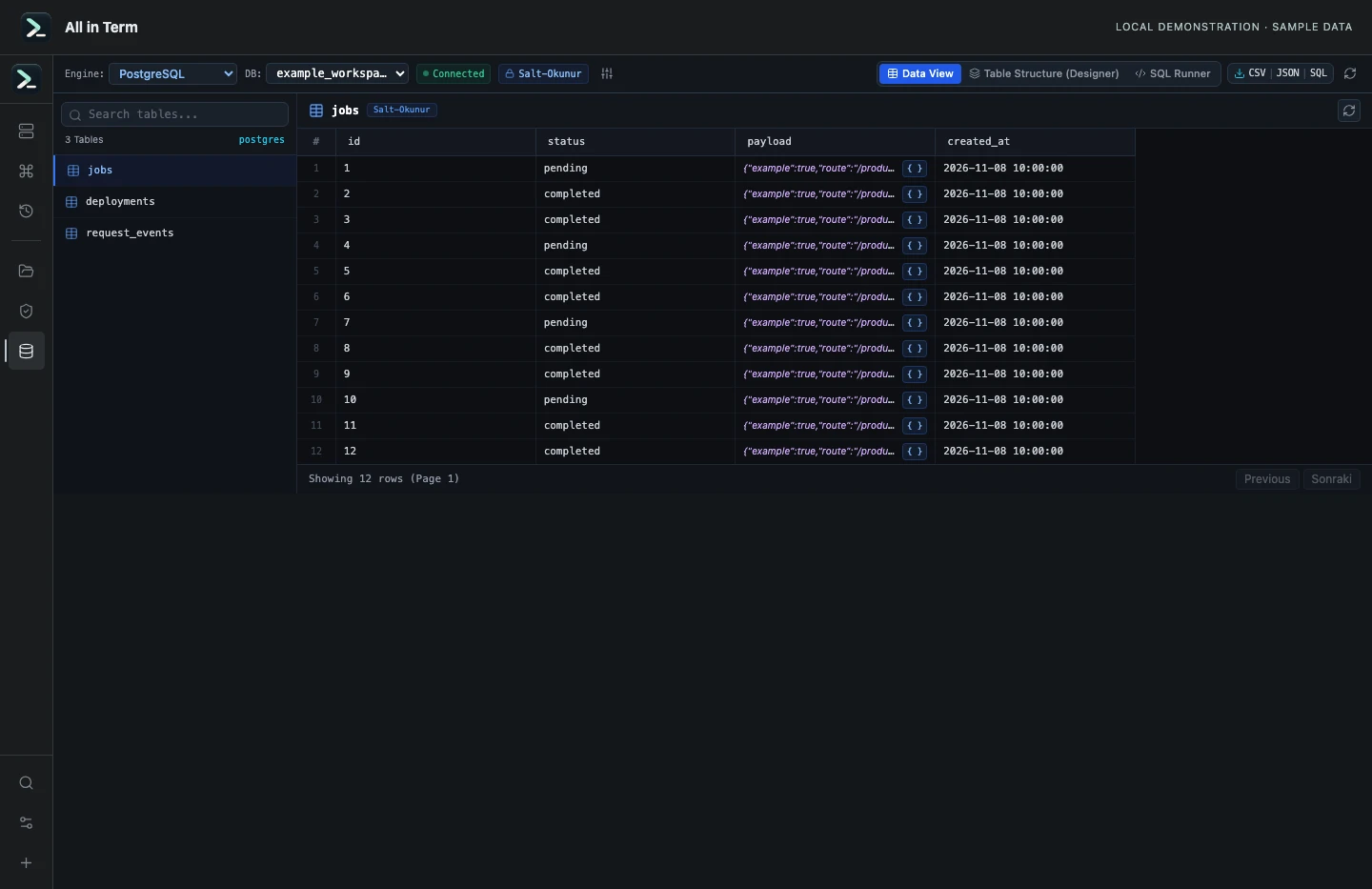
Database component with synthetic PostgreSQL-shaped rows; no database server was contacted. Captured 2026-11-08. Open the image to inspect details.
Check bounded previews and read-query validation
Executed the current query builder, preview limiter and SQL validator against a synthetic jobs schema. No PostgreSQL server was queried.
Executed check
buildTablePreviewQuery("jobs", schema, "postgres", 50, 0)
isReadOnlySqlQuery(SELECT example)
isReadOnlySqlQuery(DELETE example)
Recorded output
Generated query includes LIMIT 50 OFFSET 0: true
Large text projection includes a 2048-character bound: true
Client preview shorter than the 6,000-character fixture: true
SELECT example accepted: true
DELETE example accepted: false
Recorded 2026-11-08. Executed locally against synthetic fixtures. No production host or database was contacted. Read the recorded checks.
A small command example
Read the comments, confirm the active host and adapt any example names to your environment before running commands.
-- Example schema: replace table and column names
SELECT id, status, created_at
FROM jobs
ORDER BY created_at DESC, id DESC
LIMIT 25;
Further reading
Official documentation for the underlying tools. The workflows and synthetic examples above are editorial guidance, not performance claims.