
Make cron jobs reliable: schedules, environments, overlap and evidence
Design scheduled server tasks that have a clear owner, explicit environment, understandable timing and observable results.

A scheduled command can look correct in a list and still fail every night. It may assume a working directory that cron never provides, depend on an interactive shell setting, overlap with an earlier run or write its result somewhere nobody checks. Reliability comes from the whole job contract: when it runs, under which account, with what inputs and how completion is demonstrated. This guide follows a fictional nightly report on a Linux host managed from a Mac. It explains how to review an existing schedule and improve its operating behavior without treating the calendar expression as the entire system. Timings in the chart are illustrative.
Name the job's purpose and the result it owes
Begin with the business or operational outcome. A report job might need to produce a dated artifact before the morning review. A cleanup job might enforce a retention policy for one directory. A backup job might create material that must later pass a recovery check. These outcomes differ, and each needs its own definition of success. A process starting at the scheduled time is only an early event in that definition.
Record the owner, command location, expected duration and where its result is inspected. In All in Term, the scheduled task view helps you inspect and manage cron entries within the connected host context. Use that visibility to understand the job before editing its schedule. A readable description should explain why the task exists and who can decide whether it is safe to disable, rerun or change.
A schedule is the beginning of a job contract.
- 01
Timing
Confirm timezone and cadence.
- 02
Environment
Define account, paths and inputs.
- 03
Execution
Control overlap and side effects.
- 04
Outcome
Check completion and the artifact.
Conceptual workflow · follow each check before moving to the next step.
Read the timing in the correct implementation and timezone
Confirm whether you are reviewing a user's crontab, a system crontab or another scheduler entirely. Their formats and environments can differ. Identify the host's timezone and any scheduler-specific timezone behavior before translating an expression into a human description. A schedule interpreted in one timezone can surprise someone who reviews it from a Mac configured in another. Include the timezone beside operational notes instead of assuming the clock is shared.
Calendar edge cases deserve explicit attention when a task has strict deadlines. Daylight-saving transitions and missed execution behavior depend on the scheduler and its configuration. Check the documentation for the implementation installed on the host. For work that must catch up after downtime or run exactly once within a business period, decide whether cron alone provides the required behavior. The correct design begins with the job's timing requirement, not with a familiar expression copied from another machine.
| Concern | Define | Evidence |
|---|---|---|
| Timing | Timezone, interval and missed-run expectations | Documented schedule and implementation |
| Environment | Account, paths and required configuration | Representative execution test |
| Overlap | Skip, wait or supported concurrency | Visible lock and run behavior |
| Outcome | Expected artifact and consumer | Completion record plus result validation |
A scheduled start is only the first checkpoint.
The clock represents scheduling; the module represents execution; the artifact represents the outcome a consumer needs.
Define the environment
Record the account, paths, configuration and timezone used by the scheduled run.
Observe the outcome
Check completion evidence and the actual artifact rather than treating a schedule entry as success.
Make the execution environment explicit
An interactive terminal session often provides convenience settings that a scheduled job does not inherit. Working directory, executable lookup, configuration paths and account access can all differ. Review the script's assumptions and define the required environment through the team's normal deployment process. Use explicit paths where they improve clarity. Avoid relying on an interactive profile to quietly supply settings that the scheduler cannot be expected to reproduce.
Keep credentials out of schedule descriptions and shared screenshots. Store secrets through the mechanism intended for that service and account, with the required permissions. Then test the script in an environment representative of the scheduled run. A command that succeeds in a developer's interactive shell has passed a useful test, but not the final one. Record which account, directory and configuration were used so a later failure can be compared with a concrete baseline.

The work needs a visible result.
A scheduled start does not demonstrate completion. Preserve run evidence and verify the artifact or service behavior the task is meant to produce.
Concept illustration, not an application screenshot.Decide what should happen if the previous run is still active
Compare the expected duration with the interval between starts. If a job sometimes runs longer than its schedule interval, overlapping processes can compete for files, duplicate work or increase load. Decide whether the correct policy is to skip a new run, wait, process a backlog or allow carefully isolated concurrency. That choice belongs to the application's behavior and deadline, not to a universal scheduler setting.
A lock can support a single-run policy when it is implemented and monitored correctly. On appropriate Linux systems, flock is one option, but check the filesystem and utility behavior that your environment supports. A skipped run should remain visible if skipping can affect the intended outcome. Do not confuse an absence of concurrent processes with successful work: a permanently held or misconfigured lock can also prevent every useful execution.
Example durations for four fictional scheduled tasks
Unit: minutes per successful run. Synthetic example values, not production measurements.
Bars start at zero and share the same linear scale. Exact values are printed alongside each bar.
Observe completion, duration and the actual artifact
A useful execution record includes start time, completion time, exit status and enough context to connect the run with its output. Keep logs bounded through an appropriate retention process. For a nightly report, verify that the intended report exists, has the expected date and is usable by its consumer. A script can exit successfully after doing the wrong work, especially when it silently accepts missing inputs.
Define which failures should alert someone and who is responsible for responding. Also decide how to detect a missing run, because an absent process may produce no new error message. The synthetic chart below shows example durations for several jobs to illustrate why the interval and observation policy should be reviewed together. It does not prescribe a universal timeout. Use real workload measurements before setting a deadline or changing a schedule.
Make reruns and partial failure understandable
Consider what happens if a job stops after writing only part of its output. A rerun should have an intentional relationship with that partial state. Depending on the application, the design may use a temporary output location, a completion marker, a unique run identifier or another supported mechanism. Review the actual behavior with the application owner. Repeating a command that sends notifications or changes external data can have consequences even if the first run looked unsuccessful.
Document when a manual rerun is allowed and what must be checked first. A clear runbook names inputs, expected side effects and the evidence that prevents duplicate work. Keep the manual procedure consistent with the scheduled one so the investigation does not introduce a second execution path with different assumptions. If the work cannot be made understandable within a simple script, consider whether a more explicit job system would better match its recovery requirements.

Decide what happens when runs overlap.
The gate represents an explicit concurrency policy. Waiting, skipping and parallel execution are different choices that need observable behavior.
Choose a policy
Base overlap behavior on the job's side effects and deadline rather than copying a generic lock pattern.
Keep skips visible
A skipped run may protect concurrency while still missing the required business outcome. Record what actually happened.
Review the schedule as part of the service lifecycle
Applications change, but old scheduled tasks often remain. Review jobs after a migration, a retention change or a service retirement. Confirm that the owner still exists, the paths remain correct and the expected output still has a consumer. An unused job can continue generating files or touching a database long after everyone assumes the associated feature is gone. A schedule list is therefore also an inventory of ongoing operational commitments.
After an authorized edit, verify the saved entry and observe an appropriate run. Record what changed, why and which result confirmed the behavior. All in Term makes schedules easier to inspect alongside server state, files and logs. Use that shared context to connect timing with execution and outcome. A reliable job is not merely present in cron; it has a clear purpose, controlled assumptions and evidence that the intended work completed when it mattered.
Inside the application: a scoped local example
This capture uses the shipped UI component in an isolated renderer. The host, files and service data are demonstrations, not a production session. It illustrates the surrounding workflow; it does not verify every service-specific command in this guide.
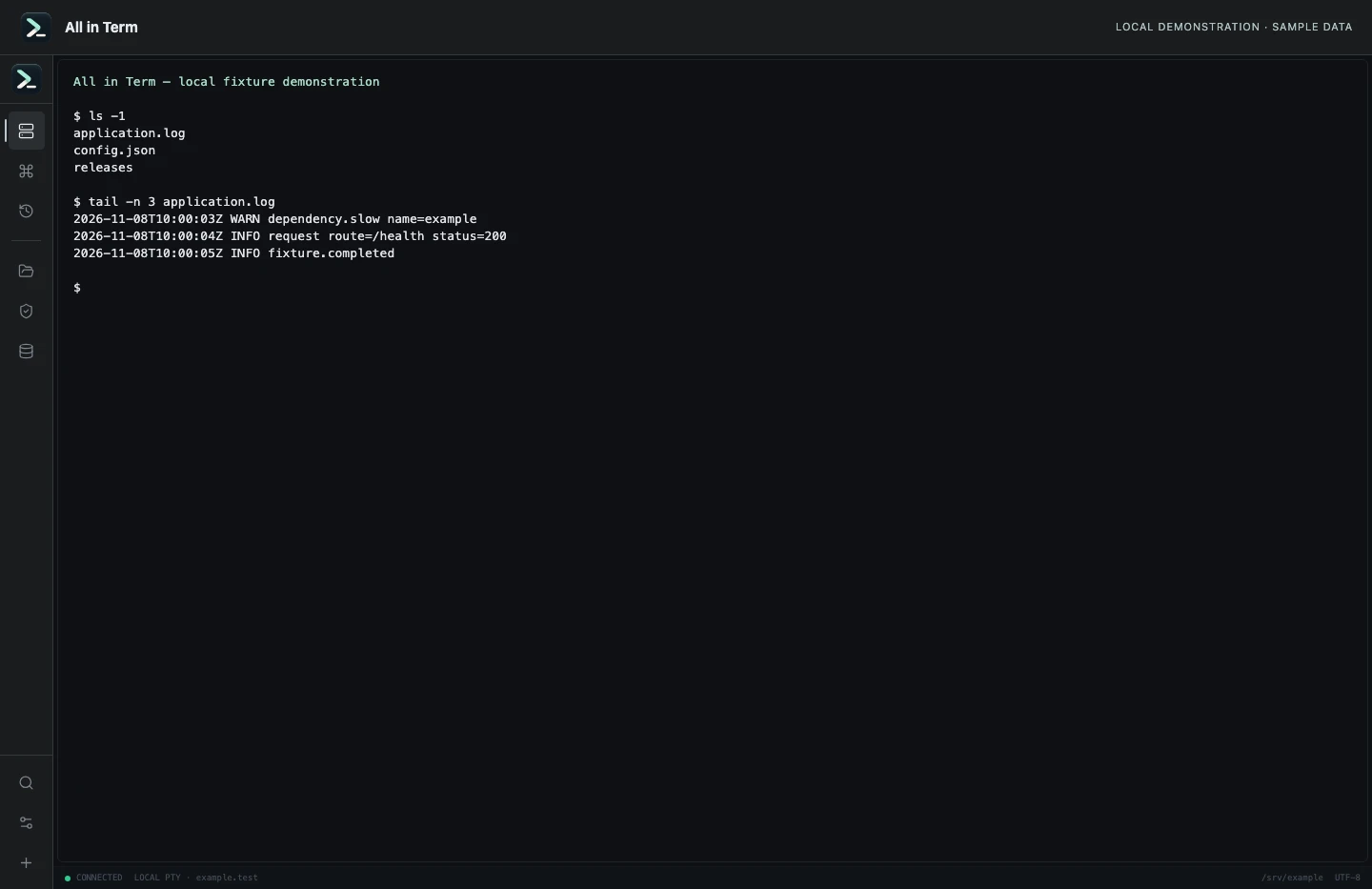
Local terminal view with command output recorded from an isolated temporary directory. Captured 2026-11-08. Open the image to inspect details.
List an isolated example directory
Executed /bin/ls against a newly created temporary directory.
Executed check
ls -1Recorded output
application.log
config.json
releases
Recorded 2026-11-08. Executed locally against synthetic fixtures. No production host or database was contacted. Read the recorded checks.
A small command example
Read the comments, confirm the active host and adapt any example names to your environment before running commands.
# Inspect the current user's schedule without changing it
crontab -l
# Read the host clock and timezone offset
date '+%Y-%m-%d %H:%M:%S %Z %z'
# Inspect a script path; replace with your actual job file
ls -l /opt/example/jobs/nightly-report.sh
Further reading
Official documentation for the underlying tools. The workflows and synthetic examples above are editorial guidance, not performance claims.